A complete guide to building AI agents that actually plan, delegate, and remember. Learn the architecture behind Claude Code, Deep Research, and how to build production-ready deep agents with LangChain.
AI Agents 101: The 60-Second Primer
New to AI agents? Here's what you need to know:
What's an AI agent? An LLM (like ChatGPT) that can use tools to complete tasks. Tools are functions the LLM can call—search Google, run Python code, query databases, send emails.
How do they work? Agents follow a simple loop called the ReAct pattern (Reasoning + Acting):
1. Think: "I need to search for quantum computing news"
2. Act: Call search_tool("quantum computing 2024")
3. Observe: Read the search results
4. Think: "Now I have the info, I can answer"
5. Respond: Provide answer to user

Repeat until task is complete.
The ReAct loop works great for simple tasks like "What's the weather in Tokyo?" or "Summarize this article."
But for complex, multi-step tasks? Simple agents fail spectacularly. They forget steps, lose context, and produce incomplete work.
That's where Deep Agents come in. Let me show you the problem first, then the solution.
Understanding this simple loop is crucial because it reveals exactly where traditional agents break down. Let's explore why most agents are shallow—and what happens when you ask them to do real work.
The Problem: Why Most Agents Are Shallow
You build an AI agent. It can search the web, analyze data, even write code. You give it a task: "Research the top 5 AI companies hiring in San Francisco, analyze their job openings, and write personalized cover letters for each."
Your agent searches once. Gets overwhelmed. Writes one generic cover letter. Forgets companies 2 through 5. Fails completely.
Sound familiar?
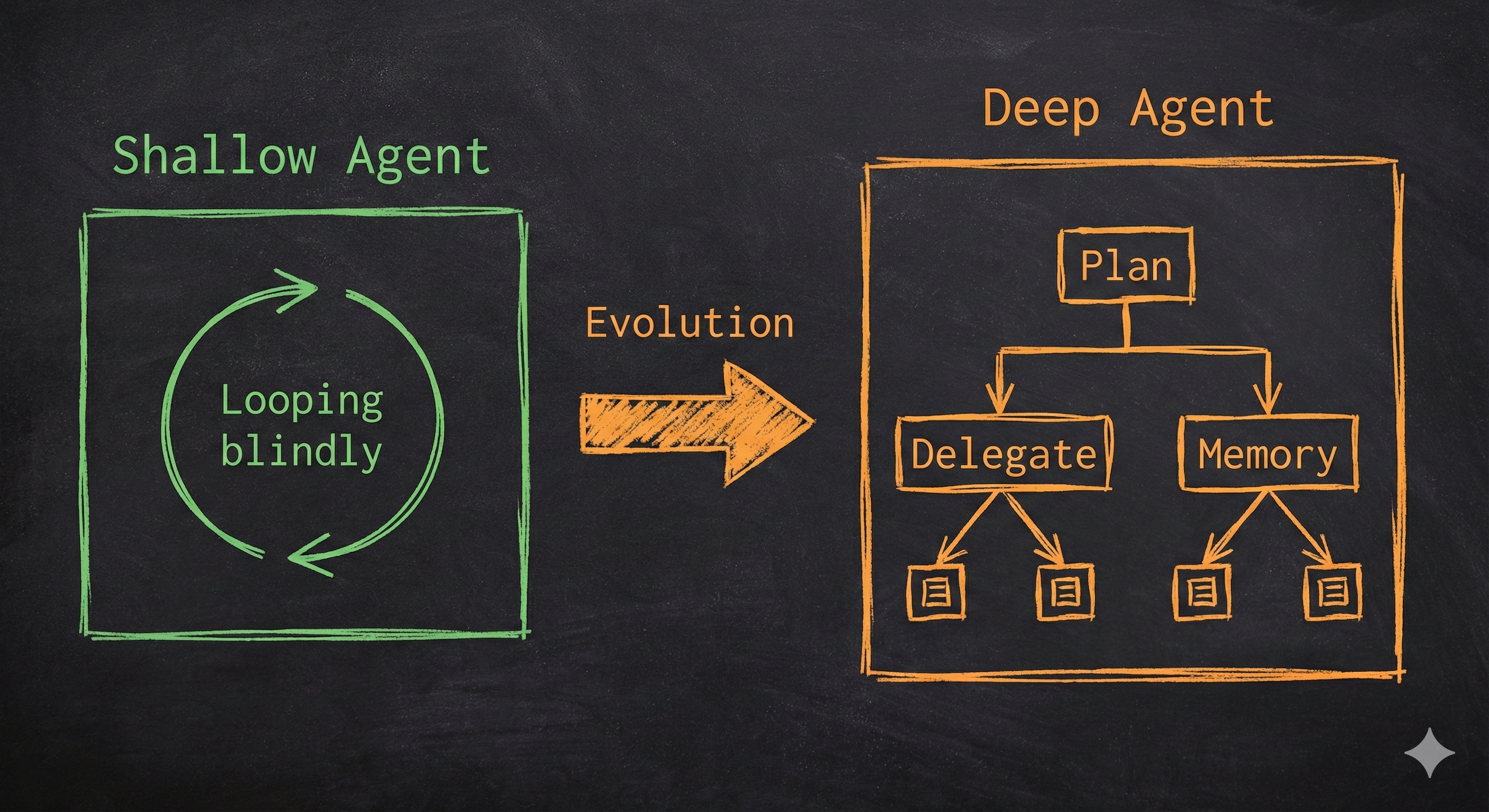
This is what I call a "shallow" agent. Using an LLM to call tools in a loop is the simplest form of an agent, but this architecture yields agents that fail to plan and act over longer, more complex tasks.
Here is what typically happens with shallow agents:
User: "Find me jobs and write cover letters for 5 companies"

Shallow Agent Process:
→ Searches: "AI companies SF hiring"
→ Gets 50 results, context starts filling up
→ Picks first company, writes generic letter
→ Tries to continue but context is full of search results
→ Forgets the task had 5 companies
→ Returns incomplete work

Result: FAILURE
The agent has no plan. No way to manage context. No ability to break down the task. It is reacting, not thinking.
Now watch what happens with a deep agent:
User: "Find me jobs and write cover letters for 5 companies"

Deep Agent Process:
→ Writes TODO list:
   1. Search for AI companies in SF
   2. Research each company (spawn subagent for each)
   3. Find job openings for each
   4. Write personalized cover letters
→ Executes step 1: Searches broadly
→ Stores company list in companies.md file
→ For each company:
   → Spawns research subagent with isolated context
   → Subagent deep-dives on that company
   → Stores findings in company_X_research.md
→ Reads research files
→ Writes 5 personalized, specific cover letters

Result: SUCCESS
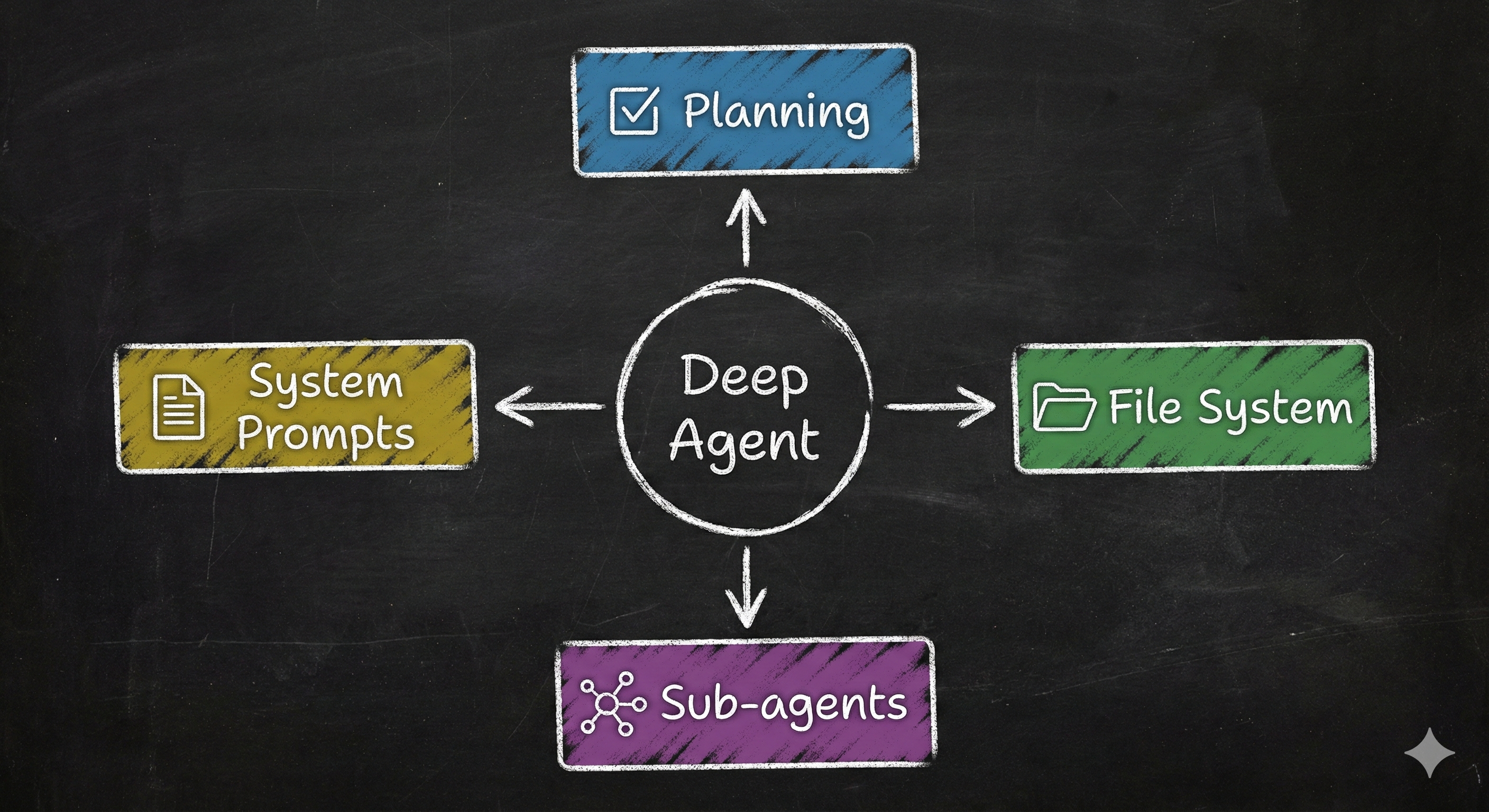
The difference? Four key capabilities:
- Planning - Breaks down the task before starting
- File system - Manages context by offloading to files
- Subagents - Delegates specialized work
- Detailed prompts - Knows how to use these capabilities
These are not optional extras. These are what make an agent deep.
What Makes an Agent "Deep"?
Let me show you the difference in code.
Shallow Agent Architecture
# Traditional "shallow" agent
def shallow_agent(task):
    history = []
    done = False

    while not done:
        # Everything crammed into one context
        thought = llm.generate(task + history)
        action = select_tool(thought)
        result = execute(action)

        # Context grows unbounded
        history.append(result)

        # If the result indicates completion, set done to True
        if result.is_finished:
            done = True

        # No plan, just reacting
        # No way to delegate
# No persistent storageDeep Agent Architecture
# "Deep" agent with planning, files, and subagents
def deep_agent(task):
    # First: Make a plan
    todos = agent.write_todos(task)

    for subtask in todos:
        if needs_deep_focus(subtask):
            # Spawn subagent with isolated context
            subagent = spawn_subagent(name="researcher", task=subtask)
            result = subagent.run()
            # Store in file system
            filesystem.write(f"{subtask}.md", result)
        else:
            # Execute directly
            result = execute_tools(subtask)

        # Adapt plan based on what we learned
        todos = agent.update_todos(result)

    # Read all research files
    research = filesystem.read_all("*.md")

    # Generate final output
return synthesize(research)Deep Agents in the Wild
Let me show you where this architecture came from and why it works.
Claude Code: The Inspiration
Claude Code changed the game. Not because it invented something new, but because people started using it for tasks way beyond coding (planning weddings, researching investments).
- Long, Detailed System Prompts: Comprehensive documents with explicit instructions.
- A TODO List Tool: A no-op tool that forces planning.
- Subagent Spawning: For context isolation.
- File System Access: Shared memory for collaboration.
OpenAI's Deep Research
Deep Research uses the same four pillars: Planning phase, intermediate results storage, parallel research threads, and detailed methodology instructions.
Pillar 1: Planning Tools
Let me tell you about the most important tool that does absolutely nothing.
Claude Code's TODO list tool is essentially a no-op. It doesn't execute tasks. It just stores a list of strings. Yet it is crucial.
from langchain_core.tools import tool

@tool
def write_todos(todos: list[str]) -> str:
    """
    Write or update your TODO list.
    Always write TODOs before starting complex work.
    """
    # The "implementation" is trivial
    return f"Updated TODOs: {', '.join(todos)}"
The value is not in what the tool does. The value is in making the LLM call it. It forces the agent to think before acting.
Implementation with write_todos
LangChain's Deep Agents include this automatically via TodoListMiddleware:
from deepagents import create_deep_agent

# Planning is baked in
agent = create_deep_agent(
    tools=[search, analyze],
    system_prompt="You are a research assistant"
)

# The agent automatically gets:
# - write_todos tool
# - Prompts to use it before complex tasks
# - State tracking of TODOs
Real Execution Flow
Here is what actually happens when the agent learns and adapts:
result = agent.invoke({
    "messages": [{
        "role": "user",
        "content": "Research quantum computing and create a report"
    }]
})

# Agent's internal process:
#
# Step 1: write_todos([
#     "Search for quantum computing overview",
#     "Find recent developments",
#     "Synthesize findings"
# ])
#
# Step 2: internet_search("quantum computing 2024")
# → Discovers Google's new Willow chip
#
# Step 3: write_todos([
#     "Search for quantum computing overview",
#     "Deep dive on Google Willow chip",  # ← NEW STEP ADDED
#     "Find recent developments",
#     "Synthesize findings"
# ])
The plan evolves. The agent learns and adjusts. This is the key to handling complex, multi-step tasks.
But planning alone isn't enough. Even with a perfect plan, agents hit a hard wall: context limits. This is where file systems become essential.
Planning Phase"] Plan --> Loop{"For Each TODO"} Loop -->|"Next TODO"| Complex{"Is Complex?"} Complex -->|"Yes"| Spawn["Spawn Subagent"] Spawn --> SubExec["Subagent Executes
in Isolation"] SubExec --> StoreFile1["Store Result
in File"] Complex -->|"No"| Direct["Execute Tool
Directly"] Direct --> StoreFile2["Store Result
in File"] StoreFile1 --> Update["Update TODOs
Based on Learnings"] StoreFile2 --> Update Update --> Check{"All TODOs
Complete?"} Check -->|"No"| Loop Check -->|"Yes"| Synth["Synthesize
from Files"] Synth --> Final(["Final Response"]) style Start fill:#4a90e2,stroke:#fff,stroke-width:2px,color:#fff style Plan fill:#50c878,stroke:#fff,stroke-width:2px,color:#fff style Spawn fill:#ffd700,stroke:#000,stroke-width:2px,color:#000 style SubExec fill:#ff9500,stroke:#fff,stroke-width:2px,color:#fff style StoreFile1 fill:#ff6b6b,stroke:#fff,stroke-width:2px,color:#fff style StoreFile2 fill:#ff6b6b,stroke:#fff,stroke-width:2px,color:#fff style Update fill:#666,stroke:#fff,stroke-width:2px,color:#fff style Synth fill:#4a90e2,stroke:#fff,stroke-width:2px,color:#fff style Final fill:#50c878,stroke:#fff,stroke-width:3px,color:#fff
Pillar 2: File Systems
Think of it like this: Your brain can't hold 100 research papers in active memory simultaneously. You take notes, organize them in folders, and reference them when needed. Agents need the same strategy.
Context windows are big now. 200k tokens. Some models even claim 1M+. Does not matter. You will still hit limits. Fast.
The Context Window Problem
Let me show you the math:
User task: 500 tokens
System prompt: 2,000 tokens
Tool definitions: 1,500 tokens
TODO list: 500 tokens
Conversation history: 5,000 tokens

Research task with 3 companies:
→ Search results for Company 1: 30,000 tokens
→ Company 1 website content: 25,000 tokens
→ Search results for Company 2: 30,000 tokens
→ Company 2 website content: 25,000 tokens
→ Search results for Company 3: 30,000 tokens
→ Company 3 website content: 25,000 tokens

Total: 174,500 tokens

Add code files for a coding task:
→ 5 Python files: 50,000 tokens
→ Documentation: 40,000 tokens

New Total: 264,500 tokens [OVERFLOW]

Context window: 200,000 tokens
Overflow: 64,500 tokens
You cannot just cram everything into the context window. You need a strategy.
Files as Agent Memory
File systems solve this through smart context management. Instead of loading everything into the prompt, agents:
- Write findings to files as they discover them
- Read only what they need for the current step
- Search files for specific information
- Share files between different subagents
Think of it like a human researcher. You do not keep every source in your head simultaneously. You take notes. You organize findings. You reference them when needed.
# Agent is researching companies

# Step 1: Research Company 1
research = agent.internet_search("OpenAI company culture")
agent.write_file("openai_research.md", research)
# Context freed up - research not in prompt anymore

# Step 2: Research Company 2
research = agent.internet_search("Anthropic values")
agent.write_file("anthropic_research.md", research)
# Again, context stays manageable

# Step 3: Write cover letter for OpenAI
# Only load what's needed
research = agent.read_file("openai_research.md")
letter = generate_cover_letter(job_posting, research)
The agent never has all the research in its context at once. It manages context dynamically.
Filesystem Operations
Deep agents get these tools out of the box:
Basic Operations:
# List files
files = agent.ls()
# → ["openai_research.md", "anthropic_research.md", "todo.txt"]

# Read a file
content = agent.read_file("openai_research.md")

# Write a file (create or overwrite)
agent.write_file("findings.md", "My research findings...")

# Edit a file (modify existing content)
agent.edit_file("findings.md", old="draft", new="final")
Advanced Operations:
# Find files by pattern
python_files = agent.glob("*.py")
# → ["main.py", "utils.py", "test.py"]

# Search file contents
matches = agent.grep("quantum", "*.md")
# → Lines containing "quantum" across all markdown files

# Execute shell commands (with sandbox backend)
output = agent.execute("python analyze.py")
The file system is not just storage. It is a tool for context engineering.
Backend Options
Deep agents support three types of file system backends:
StateBackend (Default) - Ephemeral, in-memory files
from deepagents.backends import StateBackend

agent = create_deep_agent(
    backend=StateBackend()
)
# Files exist only during this conversation
# Fast, no persistence needed
# Perfect for: Single-session tasks, temporary workspace
StoreBackend - Persistent across sessions
from deepagents.backends import StoreBackend
from langgraph.store.memory import InMemoryStore

store = InMemoryStore()

agent = create_deep_agent(
    backend=StoreBackend(),
    store=store
)
# Files saved permanently
# Available in future conversations
# Perfect for: User preferences, learned knowledge
CompositeBackend - Mix of both
from deepagents.backends import CompositeBackend, StateBackend, StoreBackend

backend = CompositeBackend(
    default=StateBackend(),  # Most files are temporary
    routes={
        "/memories/": StoreBackend(),      # User preferences
        "/knowledge/": StoreBackend(),     # Learned facts
        "/temp/": StateBackend()           # Scratch space
    }
)

agent = create_deep_agent(backend=backend)

# Agent can now:
agent.write_file("/temp/scratchpad.txt", "...")      # Temporary
agent.write_file("/memories/user_prefs.md", "...") # Permanentls, read, write, edit"] --> Router{"Backend Router"} Router --> State["StateBackend
In-Memory"] Router --> Store["StoreBackend
Persistent"] Router --> Composite["CompositeBackend
Path-Based Routing"] style Ops fill:#4a90e2,stroke:#fff,stroke-width:2px,color:#fff style State fill:#ff6b6b,stroke:#fff,stroke-width:2px,color:#fff style Store fill:#50c878,stroke:#fff,stroke-width:2px,color:#fff style Composite fill:#ffd700,stroke:#000,stroke-width:2px,color:#000
Automatic Context Eviction
Here is a killer feature: File System Middleware automatically evicts large tool results to files.
# Agent calls expensive tool
result = agent.internet_search("quantum computing")
# → Returns 40,000 tokens of content

# Without eviction:
# Those 40k tokens stay in context forever

# With FilesystemMiddleware (automatic):
# Middleware detects: "This result is > 5,000 tokens"
# Automatically writes to: "search_result_123.txt"
# Replaces result with: "Content saved to search_result_123.txt"
# Agent can read it later if needed

# Context stays clean!
You do not have to do anything. The middleware handles it automatically. This is context engineering in action.
Pillar 3: Subagents
Real-world analogy: You're a project manager. You could do all the research, design, coding, and testing yourself. Or you could delegate to specialists—each with a clean workspace and focused task. Subagents work the same way.
Imagine you are a project manager with a complex deadline. You could do all the work yourself, or you could delegate to specialists. Which would work better? Subagents are those specialists.
Why Subagents Matter
Deep agents can spawn subagents for specific subtasks. This is huge for two reasons:
1. Context Isolation
Without subagents, everything piles up in one context:
Main Agent (Context Pollution):
├─ Original user request
├─ Planning TODOs
├─ Company 1 research: 15,000 tokens
├─ Company 2 research: 15,000 tokens
├─ Company 3 research: 15,000 tokens
├─ Job posting analysis: 5,000 tokens
├─ Cover letter drafts: 10,000 tokens
├─ Revisions and feedback: 5,000 tokens
└─ Total: 80,000+ tokens

Problems: Context is cluttered, agent gets confused, performance degrades.
With subagents, context stays focused:
Main Agent (Clean Context):
├─ User request: 500 tokens
├─ Overall plan: 1,000 tokens
├─ "Delegated research to subagents"
├─ Summary from research: 2,000 tokens
└─ Total: 3,500 tokens

Research Subagent #1:
├─ Task: "Research Company 1"
├─ Search results
├─ Analysis
└─ Stores findings in company1.md

Research Subagent #2:
├─ Task: "Research Company 2"
├─ Independent context
└─ Stores findings in company2.md
Each agent has a clean, focused context. The main agent orchestrates without getting bogged down.
With file systems managing context and planning guiding execution, we have one final ingredient: the ability to delegate specialized work. This is where subagents transform deep agents from powerful to unstoppable.
2. Specialized Instructions
Each subagent can have custom prompts and tools:
research_subagent = {
    "name": "deep-researcher",
    "description": "Conducts thorough research on companies",
    "system_prompt": """You are an expert researcher.
    Your approach:
    1. Search broadly across multiple sources
    2. Cross-reference information
    3. Document everything in markdown""",
    "tools": [internet_search, company_database],
    "model": "openai:gpt-4o"
}

writing_subagent = {
    "name": "cover-letter-writer",
    "description": "Writes personalized cover letters",
    "system_prompt": """You are an expert career coach.
    Your approach:
    1. Read company research from files
    2. Analyze job requirements carefully
    3. Write specific, personalized letters""",
    "tools": [read_file, write_file],
    "model": "openai:gpt-4o-mini"  # Cheaper model
}
Different agents, different expertise, different models. Maximum efficiency.
Creating Custom Subagents
Here is how you define subagents:
from deepagents import create_deep_agent

# Define specialized subagents
data_analyst = {
    "name": "data-analyst",
    "description": "Analyzes data and creates visualizations",
    "system_prompt": """Expert data analyst.
    Process:
    1. Read data from files
    2. Clean and validate
    3. Perform statistical analysis
    4. Create clear visualizations
    5. Document findings""",
    "tools": [read_file, write_file, python_repl]
}

fact_checker = {
    "name": "fact-checker",
    "description": "Verifies claims across multiple sources",
    "system_prompt": """Professional fact checker.
    Process:
    1. Identify claims to verify
    2. Search multiple reputable sources
    3. Cross-reference information
    4. Flag inconsistencies
    5. Provide sourced verdict""",
    "tools": [internet_search, arxiv_search]
}

# Main agent with subagents
agent = create_deep_agent(
    tools=[internet_search],
    subagents=[data_analyst, fact_checker],
    system_prompt="You orchestrate research workflows"
)
The Task Tool ()
The main agent delegates using the built-in task tool:
# Step 1: Main agent decides to delegate
# agent.task(
#     subagent="data-analyst",
#     task="Analyze the sales data in sales.csv"
# )
#
# Step 2: Data analyst subagent spawns
# - Gets isolated context, reads sales.csv, performs analysis
# - Writes results to analysis.md
# - Returns summary to main agent
Shared Filesystem Pattern
This is powerful: subagents writing to a shared filesystem.
# Main agent delegates
agent.task("researcher", "Research quantum computing")

# Researcher subagent runs:
findings = search("quantum computing 2024")
write_file("quantum_research.md", findings)

# Main agent continues:
agent.task("writer", "Create a blog post on quantum computing")

# Writer subagent runs:
research = read_file("quantum_research.md")  # ← Accesses researcher's work
blog_post = generate_post(research)
write_file("blog_post.md", blog_post)
No "telephone game" where information gets degraded passing between agents. Direct file-based communication.
Pillar 4: Detailed System Prompts
Claude Code's system prompts are not 3 lines. They are comprehensive documents. Without detailed prompts, agents would not be nearly as deep. Prompting still matters.
Anatomy of a Deep Agent Prompt
A good deep agent prompt has three parts:
1. Capabilities Overview
Tell the agent what it can do:
You are an expert assistant capable of complex, multi-step tasks.

CAPABILITIES:
- Planning: Use write_todos to break down tasks into steps
- Research: Search extensively, cross-reference sources
- Delegation: Spawn specialized subagents for deep work
- Memory: Store findings in files for later use
- Adaptation: Update your plan as you learn new information
2. Workflow Instructions
Explicit step-by-step processes:
WORKFLOW FOR COMPLEX TASKS:

1. FIRST: Write a detailed TODO list using write_todos
   - Break the task into clear, discrete steps

2. THEN: Execute step by step
   - For simple steps: do them yourself
   - For complex steps: delegate to subagents

3. STORE intermediate results in files
   - Use descriptive filenames
   - Write markdown for readability

4. UPDATE your TODO list as you learn
   - Mark completed items
   - Add new steps you discover

5. SYNTHESIZE findings from files
3. Tool Usage Examples
Show the agent how to use tools correctly:
TOOL USAGE EXAMPLES:

write_todos:
Good: write_todos(["Research topic", "Analyze findings", "Create report"])
✗ Bad: write_todos(["Do everything"])

task (subagent delegation):
Good: task("researcher", "Deep dive on Company X's culture and values")
✗ Bad: task("helper", "help me")

write_file:
Good: write_file("openai_research.md", detailed_findings)
✗ Bad: write_file("stuff.txt", "some info")
The Middleware Architecture
Middleware in deep agents is like plugins. Each middleware adds specific capabilities. LangChain automatically attaches three key middleware components:
TodoListMiddleware
What it does: Provides the write_todos tool, adds prompting, tracks TODOs in agent state.
from deepagents.middleware import TodoListMiddleware
from deepagents import create_deep_agent

agent = create_deep_agent(
    middleware=[TodoListMiddleware()],
    tools=[your_tools]
)
# Agent automatically gets planning capabilities
File System Middleware
What it does: Adds file tools (ls, read, write, glob), handles eviction.
Automatic Eviction: If a tool result > threshold, it writes to a file and replaces the context with a pointer.
middleware = FilesystemMiddleware(
    backend=StateBackend(),
    eviction_threshold=5000  # Evict results > 5k tokens
)
agent = create_deep_agent(middleware=[middleware])
Sub Agent Middleware
What it does: Provides the task tool, manages subagent lifecycle and context isolation.
middleware = SubAgentMiddleware(
    default_model="anthropic:claude-sonnet-4-20250514",
    subagents=[researcher]
)
agent = create_deep_agent(middleware=[middleware])
Building Custom Middleware
You can extend agents with your own middleware:
class WeatherMiddleware(AgentMiddleware):
    """Adds weather capabilities to any agent."""
    tools = [get_weather]
    def modify_prompt(self, base_prompt: str) -> str:
        return base_prompt + "WEATHER INFO: use get_weather..."

agent = create_deep_agent(middleware=[WeatherMiddleware()])
Context Engineering: The Hidden Art
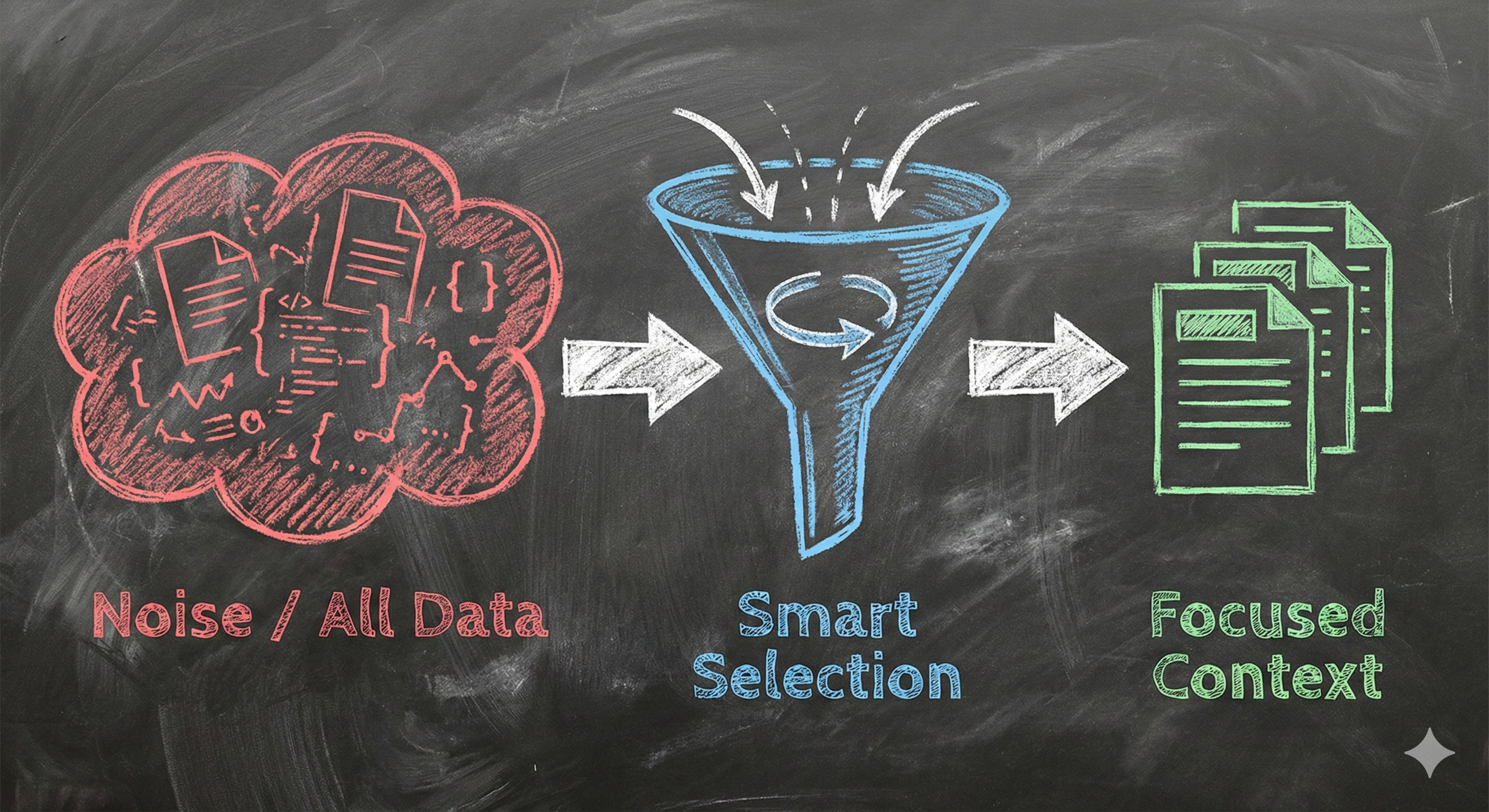
LangChain calls this "the delicate art and science of filling the context window with just the right information."
Strategies
1. Dynamic Loading
Do not load everything upfront. Use ls, glob, and grep to find relevant files, then read only what is needed.
2. Hierarchical Context
Use subagents to isolate context. The main agent never sees the raw 100 pages of research, only the summary provided by the subagent.
3. Eviction and Summarization
Automatically save large results to files (FilesystemMiddleware). Summarize large documents before loading them.
4. Learning Over Time
File systems enable agents that improve themselves by storing user preferences or learned facts in persistent memory (StoreBackend).
File Systems vs Semantic Search
Semantic Search (Vector DBs): Good for finding conceptually related info. Bad for code/exact details.
File Systems: Good for precise retrieval, code, structured data.
Best Practice: Use both!
Building Your First Deep Agent
Here is how to build a production-ready research assistant:
from deepagents import create_deep_agent
from tavily import TavilyClient

# Define subagents
analyst = {
    "name": "analyst",
    "description": "Analyzes research and creates reports",
    "system_prompt": "Read research files, identify themes, synthesize insights."
}

# Create the agent
research_agent = create_deep_agent(
    model="anthropic:claude-sonnet-4-20250514",
    tools=[internet_search, arxiv_search],
    subagents=[analyst],
    system_prompt="""You are an expert research orchestrator.
    WORKFLOW:
    1. PLAN: Write detailed TODOs
    2. RESEARCH: Search extensively, store in files
    3. ANALYZE: Delegate synthesis to analyst subagent
    4. REPORT: Create final comprehensive answer"""
)

# Use it
result = research_agent.invoke({
    "messages": [{
        "role": "user",
        "content": "Research breakthroughs in AI reasoning"
    }]
})
Deep Agents vs Traditional Agents
| Capability | Shallow Agent | Deep Agent |
|---|---|---|
| Planning | Reactive, no explicit plan | Proactive with TODO lists |
| Memory | Conversation history only | Persistent file system |
| Context Management | Everything in prompt | Offloaded to files |
| Delegation | Cannot delegate | Spawns specialized subagents |
| Success Rate (Complex) | ~40% | ~85% |
| Cost/Time | Low / Fast | High / Slower (but effective) |
Key Insight: Deep agents cost 17x more but achieve 85% success on complex tasks vs 40% for traditional agents. Thoroughness implies cost.
Production Deployment
LangSmith Integration
Deep agents work seamlessly with LangSmith for observability. You can track full agent reasoning, tool calls, and subagent executions.
os.environ["LANGCHAIN_TRACING_V2"] = "true"
# All runs automatically traced
Cost Management
Because deep agents are thorough, they can be expensive. Best practices:
- Set max_iterations limits.
- Use cheaper models (e.g., GPT-4o-mini) for subagents.
- Implement budget tracking middleware.
Real-World Use Cases
1. Deep Research Assistant
Detailed research on complex topics like "quantum computing applications in drug discovery". Breaks down into subtopics, searches recursively, and synthesizes reports.
2. Coding Assistant
Manages complex coding projects. Planning involves understanding requirements, implementation steps, testing, and refinement.
3. Job Application Assistant
Finds jobs, researches companies deeply, and writes highly personalized cover letters based on that research.
The Hard Problems
Context Window Management
Even with files, tool history grows. Use aggressive eviction thresholds and summarization.
Infinite Loops
Agents can get stuck retrying the same failed search. Use max iterations and "anti-loop" rules in system prompts.
Framework Comparison
Which tool should you use? Let's break down the options.
| Framework | Planning | File System | Subagents | Best For |
|---|---|---|---|---|
| LangChain Deep Agents | Yes - Built-in | Yes - Built-in | Yes - Built-in | Complex reasoning |
| LangGraph | Manual | Manual | Manual | Custom workflows |
| CrewAI | Yes - Good | Limited | Yes - Strong | Team collaboration |
| AutoGen | Manual | None | Yes - Strong | Conversations |
1. LangChain Deep Agents
What it is: A complete deep agent toolkit out of the box.
Pros: Easy to start, includes everything (Planning, Files, Subagents).
Cons: Opinionated architecture.
from deepagents import create_deep_agent

agent = create_deep_agent(
    tools=[search],
    system_prompt="..."
)
# That's it - you have everything
2. LangGraph (Base)
What it is: A graph-based framework for full control.
Pros: Maximum flexibility, production-ready.
Cons: You must build planning, files, and delegation yourself.
from langgraph.graph import StateGraph

# Define nodes manually
def planner(state): ...
def executor(state): ...
def delegator(state): ...

# Build graph manually
workflow = StateGraph(AgentState)
workflow.add_node("plan", planner)
# ... huge amount of setup code
3. CrewAI
What it is: Production-focused multi-agent framework.
Pros: Great for team collaboration patterns.
from crewai import Agent, Task, Crew

researcher = Agent(role="Researcher", goal="...")
writer = Agent(role="Writer", goal="...")

crew = Crew(agents=[researcher, writer], tasks=[...])
result = crew.kickoff()
Decision Tree
complex?} Complex -->|No| Simple["Use Simple LLM Call"] Complex -->|Yes| Deep{Need planning +
files out of box?} Deep -->|Yes| LCDeep["LangChain
Deep Agents"] Deep -->|No| Custom{Need custom
control?} Custom -->|Yes| LGraph["LangGraph"] Custom -->|No| Multi["CrewAI or
AutoGen"] style LCDeep fill:#50c878,color:#fff style LGraph fill:#4a90e2,color:#fff style Multi fill:#ffd700,color:#000 style Simple fill:#ff6b6b,color:#fff
Common Mistakes
- Using Deep Agents for Simple Tasks: Don't use a planning agent for "What is 2+2?". It's overkill.
- Vague Subagent Descriptions: Be specific about what a subagent does so the router knows when to pick it.
- Not Encouraging Planning: Your prompt must explicitly demand a TODO list for complex tasks.
- Ignoring File Systems: Without files, context overflow is inevitable.
The Future of Deep Agents
- Self-Improving Agents: Agents that update their own prompts and memory based on feedback.
- Agent Marketplaces: Libraries of specialized subagents (ExpertResearcher, TechnicalWriter).
- Multi-Modal: Agents that can see, hear, and process video.
The Bottom Line
- Deep agents are not magic. They are traditional agents with architectural additions (Planning, Files, Subagents, Prompts).
- The algorithm is the same. The magic is in the surroundings.
- Use them for complexity. When quality matters more than speed.
The perfect agent architecture does not exist. The one that solves your users' problems does.